


Most outreach tools are retrofitted for recruiters
The recruitment industry has been contracting. Teams are smaller, budgets are tighter, and the consultants who are left are being asked to do more, including things that used to sit with someone else entirely.
One of those things is outreach. Not just picking up the phone or sending a speculative email, but building pipeline proactively. Generating awareness in markets you haven't worked before. Nurturing candidates and clients who aren't ready to move yet. Staying visible between placements, so you're not starting from zero every time a new role comes in.
Most outreach tools are retrofitted for recruiters. Access Automate Outreach is the only multi-channel outreach platform built for recruitment and connected to your CRM.
Before you start: what Access Automate Outreach actually gives you
If you've never run a structured outreach campaign before, here's what changes when you do it with Access Automate Outreach.
Multi-channel sequences, without the manual tracking. Instead of chasing candidates and clients across email, LinkedIn, SMS, and phone, and trying to remember who you've contacted and when, you build a sequence once and the tool handles the timing. You focus on the conversations that come back.
Verified contact data for markets your CRM hasn't reached. Access Data Vault is a database of verified professionals built into Access Automate Outreach. If you want to break into a new sector, open a new geography, or run BD in a market where your CRM has no data, you don't have to wait until you've built the relationships. You can find the right contacts, search in plain English, and pull them straight into a campaign. It's how you go from zero to active conversations in a new market without starting from scratch.
Wondering where to start? Here are five common scenarios you can begin using Outreach for right from day one.
Scenario 1: You have a live role and need to move fast
A live role doesn't wait for a perfect list. The moment a Head of Finance brief lands, your best candidates are already being contacted by someone else, probably a competitor working from the same CRM data sitting in your database. Winning these roles isn't about doing more work, it's about activating what you already have faster and more consistently than everyone else.
The situation:
You've got a Head of Finance role in Manchester. Your candidates are already in Access Vincere Evo. You need to get in front of the right people today.
How to set it up:
- Target type: Candidate. Data source: Access Vincere Evo.
- Build a short, direct sequence. Four steps over seven days is enough for an urgent role.
- Build your audience. Select an existing Talent Pool from Access Vincere Evo, or filter by job title, location, industry, and functional expertise inside Outreach. Review the list before confirming.
- Launch immediately. Get the first message out as soon as the campaign goes live.
- Turn on Auto-enrich and Auto-upload to CRM. Auto-enrich fills gaps in phone numbers or emails using Access Data Vault; Auto-upload pushes that enriched data back to the Access Vincere Evo record.
| Day | Channel | What you're doing |
| Day 1 | Role introduction: direct and specific | |
| Day 3 | Send a connection request (manual: the tool will prompt you) | |
| Day 5 | Follow up with more detail on the role | |
| Day 7 | Phone | Call the candidates who've opened or clicked |
LinkedIn steps are manual tasks. The platform flags when it's time to act, but you complete the action directly in LinkedIn. That's the shift Outreach enables: not sourcing harder, but activating the talent you already have before the opportunity goes cold.
Scenario 2: You want to win clients in a sector you don't own yet
Scenario 2: You want to win clients in a sector you don't own yet
Wanting to move into a new sector is easy. Having the relationships to back it up is the part most agencies don't have on day one. The agencies that break into a new sector don't necessarily start with more contacts than you, they start with a way of finding the right ones without waiting to build the relationship first.
The situation:
You want to break into fintech in London but don't have existing relationships or warm contacts. Starting from zero.
How to set it up:
- Target type: Client. Data source: Access Data Vault.
- Build your sequence. Six steps over 18 days. Cold contacts need more touchpoints than a warm list, so lead with something useful, such as market insight, rather than a pitch.
- Find your audience. Search Access Data Vault in plain English, for example "Head of Talent in Financial Services or Fintech in London," and review the matching contacts before confirming.
- Set timing to 9am to 12pm. Senior hiring managers tend to respond better mid-morning.
- Turn on Auto-upload to CRM. Every contact you reach gets added to Access Vincere Evo automatically, so you're building your client database as the campaign runs, not after it.
| Day | Channel | What you're doing |
| Day 1 | Market insight intro: lead with something relevant to their world | |
| Day 3 | Send a connection request (manual) | |
| Day 7 | Follow up with a relevant case study or example placement | |
| Day 10 | SMS | Brief nudge |
| Day 14 | Final value-add email | |
| Day 18 | Phone | Call the most engaged prospects |
Every contact you reach becomes part of your CRM as the campaign runs, so you're building the relationships you'll need for the next role in that sector, not just filling this one.
Scenario 3: You're opening a new geography or sector from scratch
Launching a desk in a city you've never worked in usually means months of relationship-building before it produces a single placement. Building the candidate side and the client side one after the other doubles that wait; running both in parallel is what actually shortens it.
The situation:
You want to launch a tech desk in Edinburgh. No brand presence, no contacts, no pipeline. You need to go from zero to active conversations.
How to set it up:
- Run two campaigns at once. One for candidates, one for clients. Select Access Data Vault as the data source for both.
- Build your sequences. Candidates: four steps over 12 days. Clients need an extra step to build credibility first: five steps over 14 days.
- Find your audience. Search Access Data Vault for each: "Software Engineer in Edinburgh" for candidates, "Head of Engineering or CTO at a tech company in Edinburgh" for clients. Review each list before confirming.
- Stagger the launch by a day or two so you're not managing two waves of replies at once.
- Turn on Auto-upload to CRM for both. Every contact reached gets added to Access Vincere Evo, giving you a growing candidate and client database in the new market as the campaigns run.
Candidate sequence (4 steps / 12 days)
| Day | Channel | What you're doing |
| Day 1 | Introduce yourself and your specialist focus | |
| Day 3 | Send a connection request | |
| Day 8 | Follow up with a specific opportunity or market insight | |
| Day 12 | Phone | Call the most engaged candidates |
Client BD sequence (5 steps / 14 days)
| Day | Channel | What you're doing |
| Day 1 | Introduce your agency and your Edinburgh focus | |
| Day 3 | Send a connection request | |
| Day 7 | Share relevant market data or a candidate example | |
| Day 11 | SMS | Brief SMS to cut through |
| Day 14 | Phone | Call the most engaged prospects |
Both campaigns write back to the same CRM, so the market you're building shows up as one growing database, not two disconnected lists.
Scenario 4: Winning back the clients who've gone quiet
A client who placed with you eighteen months ago and hasn't heard from you since usually hasn't moved on, they've just stopped hearing from you, and a competitor is one email away from getting there first. Re-engaging an existing relationship calls for a different opening than cold outreach: these clients already know you, so the sequence should sound like it.
The situation:
40 clients placed with you in the last two years. None have engaged in six months. Some contacts may have moved roles.
How to set it up:
- Target type: Client. Data source: Access Vincere Evo.
- Build your sequence. Four steps over 14 days. Keep the tone personal. Don't open with a pitch, open with something that acknowledges the existing relationship.
- Build your audience. Filter Access Vincere Evo for clients who haven't engaged in the last six months. Review before confirming.
- Turn on Auto-enrich. Some contacts will have moved roles; the tool verifies and updates their details using Access Data Vault.
- Turn on Auto-upload to CRM to push any updated information back into Access Vincere Evo.
| Day | Channel | What you're doing |
| Day 1 | Personalised check-in. Make it warm, not salesy | |
| Day 5 | Reconnect on LinkedIn | |
| Day 9 | Share something of value such as market data or a relevant opportunity | |
| Day 14 | Phone | Call the warmest responders |
The result isn't just a re-engaged client. It's a CRM record that's accurate again.
Scenario 5: You have contractors coming off contract in the next 4–6 weeks
Fifteen contractors coming off contract in the next few weeks isn't a large book, but it's enough to matter. Wait until the contract ends and you're competing with a job board and whoever gets there first. This isn't cold outreach, you already know exactly when the window opens, so the goal is simply to be in front of it.
The situation:
15 contractors placed through you, with contracts ending soon. You want to be the first call they make.
How to set it up:
- Target type: Candidate. Data source: Access Vincere Evo.
- Build your sequence. Four steps over 12 days. Direct and warm: you have a real, time-bound reason to reach out, and the contractor knows it.
- Build your audience. Filter Access Vincere Evo by contract end date for contractors ending in the next 4 to 6 weeks, and bring that list into Outreach.
- Launch 4 to 6 weeks before the contract end date, early enough for a proper conversation, not so early it feels premature.
- Auto-enrich and Auto-upload to CRM are both optional here, but useful for keeping contact details current.
| Day | Channel | What you're doing |
| Day 1 | Proactively check in ahead of contract end and acknowledge the timing directly | |
| Day 4 | Connect or message on LinkedIn | |
| Day 8 | Follow up with relevant opportunities or market insight | |
| Day 12 | Phone | Call the most engaged contractors |
Tip: If you need to filter by contract end date or other CRM-specific fields, build the list directly in Access Vincere Evo and save it as a Talent Pool. It will be available to select at the Target Audience step inside Outreach.
Handled this way, you're the first conversation a contractor has about what's next, not the fallback option after the job board didn't work out.
Where this is heading
Access Automate Outreach is the business development pillar of Access Evo Everywhere. The goal is a recruitment platform where the moment a consultant identifies an opportunity in their CRM, the outreach capability is already there. Same place, same workflow, no context-switching.
The campaigns you run today, the contacts you source through Access Data Vault, and the data you push back into Access Vincere Evo are already part of that foundation.
Start with one campaign. See what comes back. That's how it begins.
Ready to try it yourself?
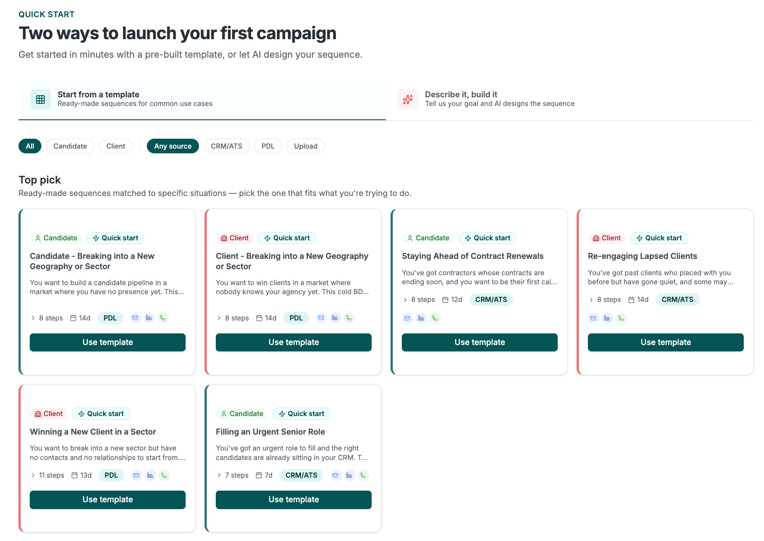
These scenarios are available out of the box in Outreach through our Quick Start templates, making it easy to get started and put these best practices into action straight away.
Want to see one of these templates running end to end?
Watch Access Automate Outreach and Access Vincere Evo work as one system →
